Creating Stand-Alone Messages
Basics of Stand-Alone Messages
The prior example showed how to connect messages that are embedded within the Basilisk modules. However, there are times where you might need to create a stand-alone copy of such a message. Some flight algorithm modules require the input of a stand-alone message that provides information about the spacecraft mass and inertia properties, or thruster or reaction wheel configuration information. For example, the module unit test ideally just runs the module being tested. Any input messages that this module needs should be created as stand-alone messages. This avoids the unit test script depending on other modules output messages, but makes the module test function on its own.
This tutorial shows you how to create a stand-alone message and connect the C++ Module: cppModuleTemplate input message to it. The syntax is identical to connect a stand-alone message to a C module. Further, this example illustrates how the simulation can be started and stopped multiple times while the message or module variables are changed between runs.
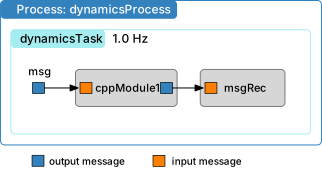
To create a stand-alone message, the message payload (i.e. data) container must be created first. Let us assume the message is of type someMsg. The corresponding payload is called someMsgPayload. Thus, the payload container is created using:
msgData = messaging.someMsgPayload()
Essentially this is a python instance of the message structure definition found in architecture/msgPayloadDefC/SomeMsg.h. The content of the message payload is zero’d on creating it. If there is a variable in the structure that we want to change, this is done simply with:
msgData.variable = .....
You may also initalize fields on construction:
msgData = messaging.someMsgPayload(variable=...)
Next, a message object is created and the message data is written to it. The message object is created using:
msg = messaging.someMsg()
The payload is written to the message using:
msg.write(msgData)
These steps can also be combined into a single line using:
msg = messaging.someMsg().write(msgData)
The simulation code below creates a stand-alone message that is then connected to the module input message.
 1
 2import sys
 3
 4import matplotlib.pyplot as plt
 5from Basilisk.architecture import messaging
 6from Basilisk.moduleTemplates import cppModuleTemplate
 7from Basilisk.utilities import SimulationBaseClass
 8from Basilisk.utilities import macros
 9from Basilisk.utilities import simHelpers
10
11
12def run():
13    """
14    Illustration of creating stand-alone messages
15    """
16
17    #  Create a sim module as an empty container
18    scSim = SimulationBaseClass.SimBaseClass()
19
20    #  create the simulation process
21    dynProcess = scSim.CreateNewProcess("dynamicsProcess")
22
23    # create the dynamics task and specify the integration update time
24    dynProcess.addTask(scSim.CreateNewTask("dynamicsTask", macros.sec2nano(1.)))
25
26    # create modules
27    mod1 = cppModuleTemplate.CppModuleTemplate()
28    mod1.ModelTag = "cppModule1"
29    scSim.AddModelToTask("dynamicsTask", mod1)
30
31    # create stand-alone input message
32    msgData = messaging.CModuleTemplateMsgPayload(dataVector = [1., 2., 3.])
33    msg = messaging.CModuleTemplateMsg().write(msgData)
34
35    # connect to stand-alone msg
36    mod1.dataInMsg.subscribeTo(msg)
37
38    # setup message recording
39    msgRec = mod1.dataOutMsg.recorder()
40    scSim.AddModelToTask("dynamicsTask", msgRec)
41
42    #  initialize Simulation:
43    scSim.InitializeSimulation()
44
45    #   configure a simulation stop time and execute the simulation run
46    scSim.ConfigureStopTime(macros.sec2nano(10.0))
47    scSim.ExecuteSimulation()
48
49    # change input message and continue simulation
50    msgData.dataVector = [-1., -2., -3.]
51    msg.write(msgData)
52    scSim.ConfigureStopTime(macros.sec2nano(20.0))
53    scSim.ExecuteSimulation()
54
55    # plot recorded data
56    plt.close("all")
57    figureList = {}
58    plt.figure(1)
59    for idx in range(3):
60        plt.plot(msgRec.times() * macros.NANO2SEC, msgRec.dataVector[:, idx],
61                 color=simHelpers.getLineColor(idx, 3),
62                 label='$r_{BN,' + str(idx) + '}$')
63    plt.legend(loc='lower right')
64    plt.xlabel('Time [sec]')
65    plt.ylabel('Module Data [units]')
66    figureList["bsk-5"] = plt.figure(1)
67    if "pytest" not in sys.modules:
68        plt.show()
69    plt.close("all")
70
71    return figureList
72
73
74if __name__ == "__main__":
75    run()
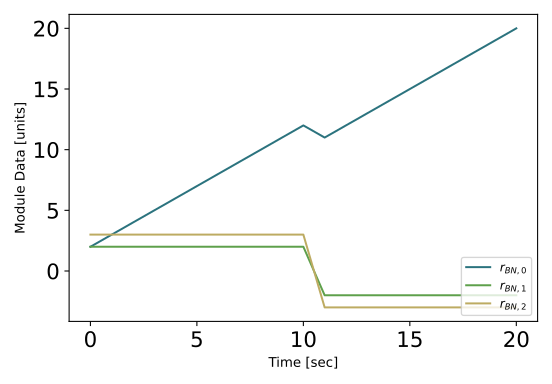
After the simulation runs for 10s, the stand-alone message data is changed and written into the message object. Note that the stand-alone message object itself doesn’t have to be re-created as this is still working and connected to the desired modules. Rather, we only have to update the content of the message.
Next, the simulation stop time is extended for an additional 10s to 20s total and the simulation is executed again. The resulting plot of the module output message is shown below.
Retaining Message Objects in Memory
Before Basilisk 2.12, a stand-alone message created inside a Python helper had to be stored in a persistent variable. Otherwise, Python could garbage-collect the message after the helper returned while a module still held pointers to its data.
Starting with Basilisk 2.12, object-based message subscriptions automatically
retain their source for the lifetime of the subscription. A stand-alone message
may therefore leave Python scope safely while an input message remains subscribed
to it. This applies whether the input reader is embedded in a C or C++ module. For
an embedded Msg_C source in a wrapped C module or C-module config, Basilisk
retains the owning object rather than the temporary Python message proxy.
Message recorders follow the same lifetime rule. A recorder created from a
stand-alone C or C++ message retains that source until the recorder is released.
A recorder created from an embedded Msg_C source retains the C-module wrapper
or config that owns the message storage.
Python Message.read() and C++ reader calls such as module.dataInMsg()
return live payload views. Each view retains its source through a Python reference, so a
Python-owned source remains alive even if the original message variable goes
out of scope or the original reader unsubscribes, changes subscriptions, or is
destroyed. The view continues to reflect writes to its original message. Its
reference to that source is released when the view is garbage collected. If a
message caches its own payload view, Python can collect the reference cycle once
no external owners retain the message or view.
For example, this helper does not need to return or otherwise retain inputMsg:
def connectInput(module):
    """Create and connect a stand-alone input message."""
    payload = messaging.CModuleTemplateMsgPayload(dataVector=[1.0, 2.0, 3.0])
    inputMsg = messaging.CModuleTemplateMsg().write(payload)
    module.dataInMsg.subscribeTo(inputMsg)
Keeping an explicit Python reference remains valid and can make ownership clearer. It is also useful when the caller needs to write new data, inspect the message, unsubscribe and reconnect it, or otherwise access it later:
class BskSimulation:
    def __init__(self):
        self.inputMsg = messaging.CModuleTemplateMsg()

    def connectInput(self, module, payload):
        """Write and connect the retained input message."""
        self.inputMsg.write(payload)
        module.dataInMsg.subscribeTo(self.inputMsg)
The automatic lifetime guarantee has the following boundaries:
Calling
unsubscribe()releases the subscription’s reference. Retain the message explicitly if it must be available for a later reconnection.Subscribing by a raw integer address is caller-owned and does not retain a Python source object.
This guarantee applies to message sources connected through
subscribeTo(). Modules, sensors, effectors, and other wrapped simulation objects can have separate ownership requirements and may still need persistent Python references.