Usage Metrics
Basilisk collects daily PyPI and GitHub usage metrics with the
Collect Usage Metrics GitHub Actions workflow. The workflow writes durable
history to the orphan usage-metrics branch so routine snapshots do not add
commits to develop or trigger the normal build workflow. This branch retains
one snapshot commit containing the complete collected history, rather than
accumulating a new Git commit for every daily update.
Usage Plot
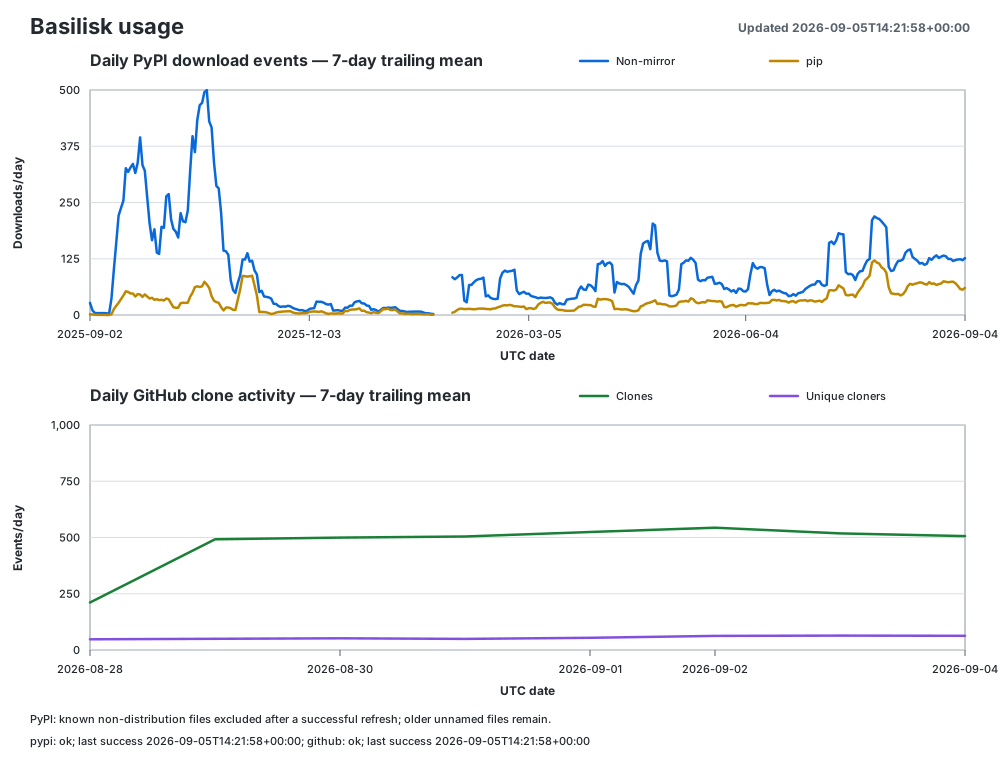
The metrics workflow regenerates the following plot after every successful
collection. The documentation references the image on the usage-metrics
branch, so readers see the latest published data without waiting for another
documentation build. The plotted lines show seven-day trailing means; exact
daily values remain available in metrics.csv.
A plotted mean requires seven consecutive observed UTC dates. Explicit zero counts are included, but missing dates are unknown and break the series until another complete window is available. In particular, ClickPy’s lack of records for a date does not establish zero downloads: it may reflect an ingestion gap. The latest reported day’s count may still be partial.
Note
The Recorded wheel download requests box counts requests for known
BSK filenames ending in .whl from all clients except identified mirrors
and repository caches listed below. This includes pip and uv (Python
package installers), browsers, Poetry, scripts, and unidentified clients.
Source archives, metadata files, signatures, and records without filenames
are excluded. The BSK wheels line uses the same daily counts, displayed
as a seven-day trailing mean.
The box sums daily counts over the displayed coverage dates, independently of the plotted averages, and updates with each metrics collection. It shows the number of observed days; missing dates remain unknown. Repeat requests, automated builds, and partial wheel requests may be included. The count does not verify full-file transfers, completed installations, or unique users. Requests served entirely from local caches or private mirrors are not recorded by PyPI. Broader distribution and installer counts remain available in the CSV and summary; they use a different counting rule and may include older metadata requests when filenames are unavailable.
Collected Metrics
The branch contains the following generated files:
metrics.csvOne row per UTC date. It contains PyPI download events, downloads made by
pipanduv, a separatepypi_wheel_requestscount, GitHub clone events and daily unique cloners, and snapshots of the current fork and release-asset download counts.summary.jsonMachine-readable current totals, source coverage dates, and the latest successfully retrieved GitHub clone window. Schema version 2 also records each source’s status, last attempt, last successful collection, and error. Schema version 3 adds
uv_downloads,uv_coverage, and the combinedpip_uv_downloadstotal withpip_uv_coveragedates and observed-day count. Schema version 4 addswheel_requestsandwheel_request_coverage, including the dates and number of observed days used by the wheel-only box.README.mdA human-readable summary and the interpretation caveats for each metric.
usage.svgA light- and dark-theme wheel-request total box and plot of the seven-day trailing means for BSK wheel requests and GitHub clone activity.
PyPI history is read from the public PyPI data replicated by
ClickPy. The non-mirror distribution counts
and wheel requests exclude bandersnatch, z3c.pypimirror, Artifactory,
and devpi from the PyPI Stats known-mirror list,
plus nexus, an identified repository cache. The separate
pip and uv counts select records identified with those installers.
The broader distribution counts exclude records with a known filename that does not end in
.whl, .tar.gz, or .zip. This removes identifiable metadata sidecars
and signatures. Older records without filenames are retained because they
cannot be reliably classified. A successful collection refreshes returned
historical dates with this filter and the current mirror exclusions; totals can
decrease after a refresh. The wheel-request total instead requires a known
.whl filename and never infers wheel requests from these broader counts.
Missing CSV values are blank rather than zero. If a source has never been
collected successfully, its unavailable summary counts are JSON null.
Source Failures and Freshness
The collector retrieves PyPI and GitHub data independently. When one source fails, it publishes the available observations and retains the other source’s earlier data. It does not copy old fork or release counts into a new daily snapshot. The last successful GitHub API window is retained as a whole, including its unique-cloner count; it is never reconstructed by adding daily unique counts.
In summary.json, collection_status is complete or partial.
Each entry under sources contains status (ok or error),
last_attempt_at, last_success_at, and error. The README and plot also
show source freshness. generated_at is the artifact generation time, not
the freshness of every source. Even a successful API request may return delayed
data, so check the source coverage dates as well.
After publishing a partial collection, the workflow reports a failed run so maintainers can investigate. If both sources fail, it leaves published artifacts unchanged and fails without publishing. A remote lookup, fetch, or history restore failure also stops publication. Only a successful remote lookup that confirms the metrics branch is absent permits an initial collection.
The workflow restores both metrics.csv and summary.json. Version 1, 2,
and 3 summaries and their CSV formats are accepted and upgraded. A successful
PyPI collection backfills uv and wheel-request counts for returned historical
dates. Older rows without pypi_wheel_requests remain unknown until backfilled;
if no wheel-request history is available, the box displays Unavailable.
If PyPI is unavailable during a version 1 upgrade, pypi.counting_policy
remains legacy_unfiltered until a successful refresh. Normal filtered
collections use distribution_files_or_unknown_filename.
Snapshot Publication
Each collection restores the current CSV and summary before merging new
observations. Publication replaces the metrics branch with one parentless
commit containing the updated files. All retained dates remain in
metrics.csv; only the previous Git commit history is discarded. The first
publication using this policy also collapses any existing daily commit chain.
No separate history-cleanup schedule is needed.
The workflow serializes metrics runs and uses an explicit
--force-with-lease tied to the exact revision restored for collection.
If another writer changes or deletes the branch in the meantime, publication
fails without overwriting that change. The branch is never deleted as a
cleanup step, and a failed push leaves the published snapshot intact.
Git-based rollback to earlier snapshots is not retained; download a separate
copy of the artifacts when a backup is needed.
GitHub Configuration
GitHub exposes clone traffic only to repository collaborators and retains only
the latest 14 days. The workflow reads the existing BOT_ACCESS_TOKEN
Actions secret. That token must be either:
a fine-grained token with read-only repository Administration permission; or
a classic token with sufficient access to read the repository traffic API.
See the GitHub repository traffic API for the current permission
requirements. The token is used only for API reads. The workflow’s scoped
GITHUB_TOKEN publishes the generated files, so repository Actions settings
must permit workflows to write repository contents.
After the workflow reaches the default branch, run it once manually to seed the
usage-metrics branch. The daily schedule then merges GitHub’s overlapping
14-day windows, which preserves clone counts beyond GitHub’s retention period.
Retrieving the Data
The usage-metrics branch becomes available after the first successful
workflow run. Because the Basilisk repository is public, anyone can read the
generated data; no GitHub token or repository membership is required.
The branch and its rendered summary can be viewed at github.com/AVSLab/basilisk/tree/usage-metrics. The individual data files can be downloaded directly:
curl --fail --location --remote-name \
  https://raw.githubusercontent.com/AVSLab/basilisk/usage-metrics/metrics.csv
curl --fail --location --remote-name \
  https://raw.githubusercontent.com/AVSLab/basilisk/usage-metrics/summary.json
curl --fail --location --remote-name \
  https://raw.githubusercontent.com/AVSLab/basilisk/usage-metrics/usage.svg
To inspect or copy the files without switching the current checkout away from its source branch, fetch the metrics branch as a remote-tracking branch:
git fetch origin +usage-metrics:refs/remotes/origin/usage-metrics
git show origin/usage-metrics:metrics.csv
git show origin/usage-metrics:summary.json
The leading + permits refreshing this deliberately rewritten remote-tracking
branch without changing the current source checkout. To obtain the generated
files together as a single snapshot, clone only the orphan branch into a
separate directory:
git clone --branch usage-metrics --single-branch \
  https://github.com/AVSLab/basilisk.git basilisk-usage-metrics
Interpretation Limits
PyPI supplies file-download events, not successful installations or unique users. Repeated installs, continuous integration, caches, mirrors, and other installers affect the counts.
Wheel requests cannot currently be separated into full-file transfers and partial HTTP range requests using the ClickPy fields collected here. A request to inspect only part of a wheel can contribute to the box. The known-filename requirement also omits older records that cannot be classified, so the box is not a complete lifetime count.
PyPI changed its download logging on August 24, 2026, to exclude metadata requests, leaving older source records unchanged. Although the collector removes identifiable non-distribution files, older entries without filenames may still include these requests. Historical totals and trends are therefore not fully comparable across this change. See PyPI’s explanation of the counting change.
GitHub’s window-level unique-cloner count must not be added across windows or dates because the same user can occur more than once. The fork count represents currently existing forks, not every fork ever created. Release-asset downloads include only files explicitly uploaded to a release; GitHub does not publish a download count for automatically generated source ZIP and tar archives.