scenarioThrArmControl
It’s recommended to review the following scenario(s) first (and any recommended scenario(s) that they may have):
examples/mujoco/scenarioReactionWheel.pyexamples/BskSim/scenario_BasicOrbit.py
Overview
This script demonstrates regulation control of a 6-DOF spacecraft with two
attached 4-DOF thruster arms using the MuJoCo physics engine within the BSK_Sim
architecture. Scenario settings, including the spacecraft model, controller
gains, and task rates, are provided by RegulationConfig.
The multi-body system is created from the MuJoCo XML file
sat_w_thruster_arms_regulation.xml. It consists of a central hub and two
arms, each with four hinged joints, and an end-mounted
thruster. MuJoCo single-input actuators command the hinged joints and
thrusters, while separate actuators can apply torque directly to the hub.
The script is found in the folder basilisk/examples/mujoco and executed by using:
python3 scenarioThrArmControl.py
Two simulation processes are created: one which contains dynamics modules, and one that contains the Flight Software (FSW) modules. The Dynamics process contains a single task with the modules:
MJScene: the MuJoCo dynamics module that simulates the multi-body system defined in the XML fileMJSystemCoM: extracts the center of mass position and velocity of the multi-body system from the MuJoCo sceneMJSystemMassMatrix: extracts the mass matrix of the multi-body system from the MuJoCo sceneMJJointReactionForces: extracts the internal reaction forces and torques of the multi-body system from the MuJoCo scene
The FSW process contains four tasks: an outer-loop control task, a joint-motion task, a thruster-firing task, and an always-enabled recorder task. The recorder task has no modules by default; scenarios can add recorders that must execute at every FSW time step. The outer-loop control task includes:
inertial3D: generates an inertial reference attitudeattError: computes the attitude error between the current and reference attitudemrpFeedback: computes the attitude control torqueinertialCartFeedback: computes the positional control forcejointThrAllocation: determines the joint angles and thruster forces needed to achieve the desired control torque and forcethrFiringRound: determines quantized thruster on-times from the allocated thruster forces
The modules for the joint motion task include:
hingedJointArrayMotor: determines the motor commands for the hinged joints of the thruster armsjointMotionCompensator: optionally determines hub compensation torques that counter arm-motion reaction torquesjointArrayRefProfiler: optionally profiles allocated joint references before they are sent to the joint motors
The modules for the thruster firing task include:
thrOnTimeToForce: converts on time to thruster forcethrJointCompensation: determines the motor commands to hold hinged joints static during thruster firing
The joint-motion and thruster-firing tasks are enabled and disabled using three events: joint motion, thruster firing, and coasting. Each new allocation from the outer loop begins the event sequence. The recorder task remains enabled through these transitions.
Joint Motion Event:
Condition: A new allocated joint-angle and thruster-on-time command is received.
Action: Enables joint motion for a nonzero requested pulse. A zero-pulse command does not begin a new thrust sequence.
Thruster Firing Event:
Condition: The joints reach the allocated angle and rate references.
Action: Enables the thruster-firing task and applies the cached on-time command.
Coasting Event:
Condition: The requested firing completes, or the outer loop requests no firing.
Action: Zeros actuator commands and allows the spacecraft to coast until the next outer-loop update.
Control-Period Timing and Pulse Truncation
The outer control loop updates every 10 seconds (0.1 Hz). At each update, it
allocates a force to each thruster for the coming period. Since a thruster
fires at a fixed force rather than continuously varying its output,
thrFiringRound converts the allocated force into a requested on-time:
on-time = 10 s * allocated force / maximum thruster force. A request for
half the maximum force therefore becomes a 5-second pulse. The module clips
the requested on-time to the 10-second period, rounds it to the configured
pulse resolution, and applies the configured minimum on-time.
This calculation uses the full outer-loop period; it does not account for
joint motion. For a nonzero pulse request, the arms first move to their
commanded angles and settle within the position and rate tolerances. Only
then does firing begin. The time available to fire is therefore roughly
max(0, 10 s - joint-motion time), and the delivered pulse cannot exceed that
remaining time. At the next outer-loop update, any unfinished pulse is
stopped and discarded rather than carried into the next period.
For example, if joint motion takes 8 seconds and the requested pulse is 5 seconds, the thruster fires for only about 2 seconds; the remaining 3 seconds are not delivered. If thrusters request different pulse lengths, this cutoff can also change the ratio of their delivered impulses. This is an intentional saturation of the available firing window, not a reduction of the on-time request itself. The controller does not make up the missing impulse within that period. At the next update, however, it computes a new command from the current spacecraft state, so the resulting control error can affect later commands. Because both the requested on-time and the available firing window depend on the 10-second period, changing the outer-loop period alone does not preserve the same impulse behavior.
Illustration of Simulation Results
showPlots = True, runTime = 500.0
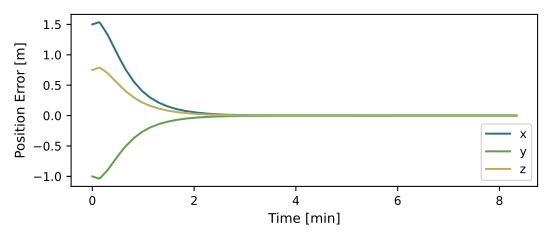
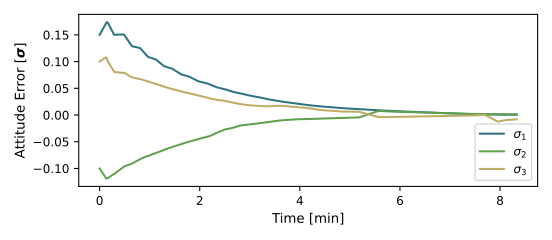
- scenarioThrArmControl.run(showPlots: bool = False, runTime: float = 500.0, showProgressBar: bool = True, savePlots: bool = False)[source]
The scenario can be run with the following setup parameters:
- Parameters:
showPlots (bool) – Determines if the script displays plots.
runTime (float) – Simulation duration in seconds.
showProgressBar (bool) – Determines if Basilisk displays execution progress.
savePlots (bool) – Determines if the position and attitude figures are saved as SVG files.