scenarioStochasticDrag
This scenario uses MJScene as its DynamicObject, although it is
not its main focus. For context on dynamics using MJScene, check out:
examples/mujoco/scenarioReactionWheel.py
This script shows how to simulate a point-mass spacecraft using MJScene (mujoco-based dynamics) with cannonball drag force and a stochastic atmospheric density model. The script illustrates how one defines and handles dynamic states that are driven by stochastic terms.
The spacecraft definition is given in CANNONBALL_SCENE_XML; it contains a
single body for which we set its mass directly. A
simIncludeGravBody gravity factory creates the point-mass Earth and
attaches it to the MuJoCo scene.
The drag force acting on the body is computed in the CannonballDrag module. This takes as input the state of the spacecraft (so that its velocity and orientation) and the atmospheric density. It outputs a force vector on the body-fixed reference frame (more accurately, the body’s center of mass frame/site).
The atmospheric density used on the drag model is given by:
where densityExponential is computed by the C++ Module: exponentialAtmosphere model
while densityCorrection (written above as \(\delta_\rho\)) is a stochastic process centered at zero. This process
is modeled as an Ornstein-Uhlenbeck (OU) process, whose Stochastic Differential
Equation (SDE) is given by:
where theta and sigma are the terms that characterize the OU process.
In the SDE above, -theta*densityCorrection represents the ‘drift’ term (the
classical derivative). sigma, on the other hand, represents the ‘diffusion’
term, which maps the influence of the noise to the state.
The densityStochastic and densityCorrection are computed in
StochasticAtmDensity, which is based on
MeanRevertingNoise.
Alternatively, running with useIgbm=True models the density factor with an
inhomogeneous geometric Brownian motion (IGBM) instead, using
IgbmAtmDensity (based on
InhomogeneousGeometricBrownianMotion):
with mean level \(\mu = 1\). The IGBM noise is multiplicative and its exact process is a positive, mean-reverting factor \(x\); IgbmAtmDensity clamps the corrected density to be non-negative to guard against the rare non-positive \(x\) an explicit integrator can produce. Both models are configured with the same stationary standard deviation and time constant, so the two runs are statistically comparable.
Illustration of Simulation Results
The following images illustrate a possible simulation result.
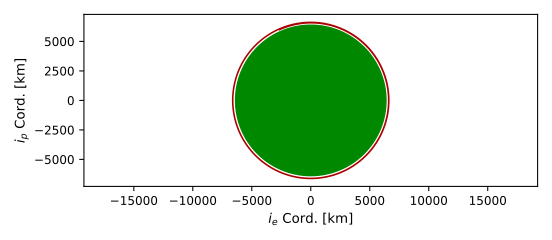
The orbit is plotted in the orbital plane:
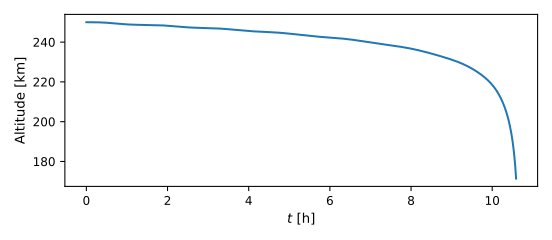
The altitude as a function of time is plotted.
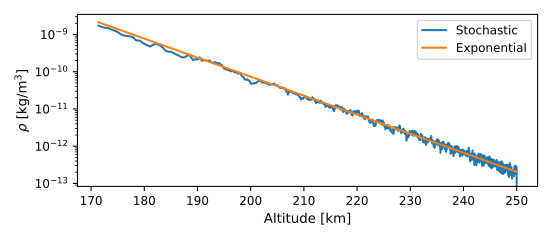
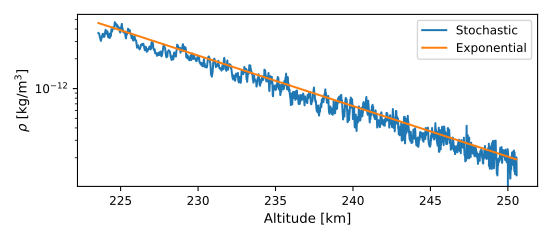
The atmospheric density as a function of altitude is plotted in lin-log space. This shows two lines: the deterministic, exponential density (should appear linear); and the stochastic density.
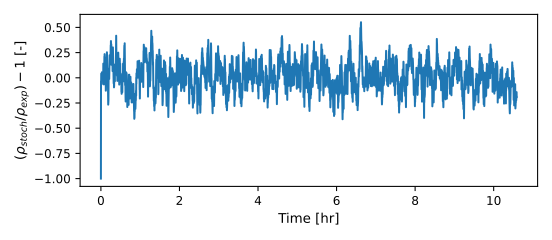
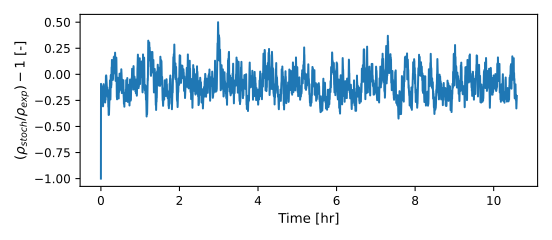
The atmospheric density correction, which should have a standard deviation of 0.15.
The magnitude of drag force over time is plotted in lin-log space.
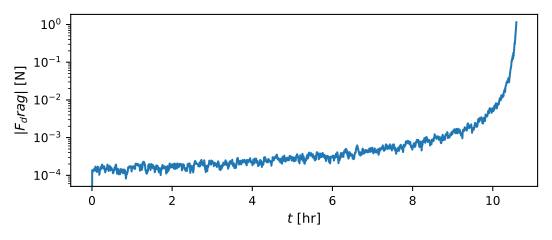
Illustration of Simulation Results with IGBM
The following images illustrate a possible simulation result with useIgbm=True
(figure names gain an igbm tag). The overall trajectory is statistically similar to
the OU case since both processes share the same stationary standard deviation and time
constant; the qualitative difference is in the density factor, which is strictly
positive under IGBM.
The atmospheric density as a function of altitude:
The atmospheric density correction \(x - 1\), which should have a standard deviation of 0.15 about a positive mean-reverting factor \(x\):
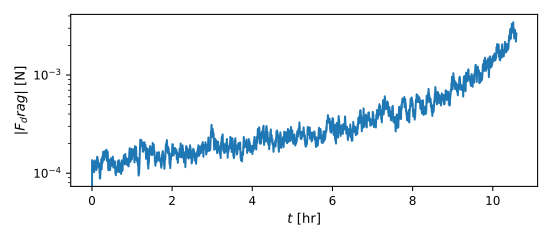
The magnitude of drag force over time:
- scenarioStochasticDrag.plotOrbits(timeAxis, posData, velData, dragForce, deterministicDenseData, denseData, oe, mu, planetRadius, figureTag='')[source]
Plot the results of the stochastic drag simulation, including orbit, altitude, density, density difference, and drag force over time.
- Parameters:
timeAxis – Array of time values.
posData – Position data array.
velData – Velocity data array.
dragForce – Drag force data array.
deterministicDenseData – Deterministic atmospheric density data.
denseData – Stochastic atmospheric density data.
oe – Classical orbital elements object.
mu – Gravitational parameter.
planetRadius – Radius of the planet.
figureTag – Optional tag inserted into figure names (e.g. “igbm”), so the variants get their own documentation images.
- Returns:
Dictionary of matplotlib figure objects.
- scenarioStochasticDrag.run(showPlots: bool = False, useIgbm: bool = False)[source]
Main function, see scenario description.
- Parameters:
showPlots (bool, optional) – If True, simulation results are plotted and show. Defaults to False.
useIgbm (bool, optional) – If True, model the stochastic density factor with an inhomogeneous geometric Brownian motion (multiplicative noise, strictly positive) instead of the additive Ornstein-Uhlenbeck correction. Defaults to False.