C++ Module: eclipse
Executive Summary
The eclipse module is responsible for determining whether or not a spacecraft is experiencing a solar eclipse and how much of it is occluded. The module works on a list of spacecraft state messages, as well as a list of planets.
Message Connection Descriptions
The following table lists all the module input and output messages. The module msg variable name is set by the user from python. The msg type contains a link to the message structure definition, while the description provides information on what this message is used for.
Msg Variable Name |
Msg Type |
Description |
|---|---|---|
sunInMsg |
sun ephemeris input message name. |
|
planetInMsgs |
A vector of planet incoming state message names ordered by the sequence in which planet are added to the module. |
|
positionInMsgs |
vector of msgs for each spacecraft position state for which to evaluate eclipse conditions. |
|
eclipseOutMsgs |
vector of eclipse output msg names. |
Detailed Module Description
The eclipse module is responsible for determining whether or not a spacecraft is within the shadow of a solar eclipse and if so, how much. The module finds the states of the sun, spacecraft and planets of interest, allowing each body’s position to be related and the construction of the conical shadow model. This provides the means for computing what percent of the spacecraft is illuminated where a illumination factor of 0.0 represents a total eclipse and 1.0 represents no eclipse.
To determine the states of the bodies in question, messages are passed into the code. For the spacecraft, Cartesian vectors provide the position and velocity of its center of mass. For the sun and planets their ephemeris messages are read in. The planets desired to be used in the module are specified through the python method addPlanetToModel(), where the planet spice state message is the input. If given multiple planets, the code iterates through the planet list and determines which is the closest to the spacecraft. The figure below illustrates how the states are represented and will be identified in the mathematical model. Calculations in this model are taken from Montenbruck and Gill’s text Satellite Orbits Models, Methods and Applications.
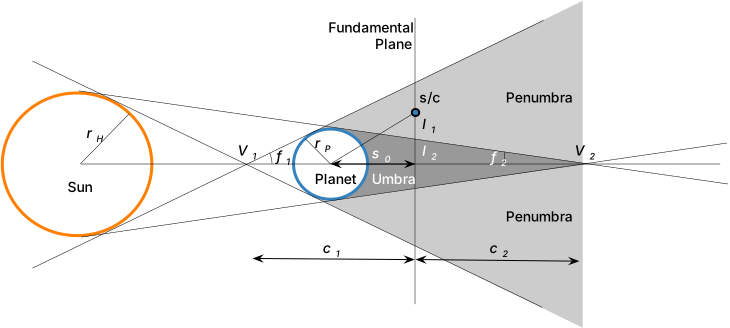
Figure 1: Illustration of the Planet’s Umbra and Penumbra Regions
Determining States
The initial step in the eclipse module is to obtain the celestial bodies’ state data and transform them into usable terms. The relationships shown below remove the dependency on relating position to the inertial frame \(N\) and instead utilize the planet \(P\), spacecraft body \(B\), and helio \(H\) frames.
The previous three equations provide coordinates for the sun with respect to both the occulting planet and occulted spacecraft as well as the spacecraft’s position with respect to the planet, respectively. The parameters on the right side of these equations come from the input state data where \(\mathbf{r}_{N/H}\), \(\mathbf{r}_{N/P}\), and \(\mathbf{r}_{N/B}\) are the sun, planet, and spacecraft positions in the inertial frame.
This module supports the use of multiple occulting bodies, so it is important to analyze only the planet with the highest potential to cause an eclipse. Thus, the closest planet is determined by comparing the magnitude of each planet’s distance to the spacecraft, \(|\mathbf{s}_{P/B}|\). Note that if the spacecraft is closer to the sun than the planet, i.e. \(|\mathbf{r}_{B/H}| < |\mathbf{s}_{P/H}|\), an eclipse is not possible and the illumination fraction is immediately set to 1.0.
Eclipse Conditions
When analyzing the conical shadow model, there are critical distances and conical dimensions that must be considered. These parameters are determined by first knowing the planet’s equatorial radius \(r_P\), which is used to solve for the angles of the shadow cones. Angles \(f_1\) and \(f_2\) are computed as shown below, where the subscript 1 relates to the cone of the penumbra and 2 relates to the umbra.
Here \(r_H\) indicates the equatorial radius of the sun, which is 695000 km. Both the sun and planet radii must be input in terms of meters.
As shown by Figure 1: Illustration of the Planet’s Umbra and Penumbra Regions, the fundamental plane is perpendicular to the shadow axis and coincident with the spacecraft body. The distance between the plane-axis intersection and the center of the planet is given by \(s_0\) as shown by Eq. (6).
This distance and the shadow cone angles can now be used to determine the distances, \(c_1\) and \(c_2\), between the fundamental plane and the cones’ vertices \(V_1\) and \(V_2\). These are calculated as follows:
As shown in Eq. (9) and (10), these are then used to find the radii, \(l_1\) and \(l_2\), of the shadow cones in the fundamental plane.
Finding these parameters provides insight into the type of eclipse that the spacecraft is experiencing. To determine the type, it is useful to compare the cone radii to the distance between the spacecraft and the shadow axis, which is given by \(l\).
Total and annular eclipses both require the spacecraft to be relatively close to the shadow axis, where \(|l|<| l_2|\). The difference between these two types is that the planet is closer to the spacecraft for a total eclipse (\(c_2 < 0\)) than during an annular eclipse (\(c_2 > 0\)). If the spacecraft is further from the shadow axis but still within a cone radius (\(|l|<| l_1|\)), it is experiencing a partial eclipse.
Percent Shadow
With the eclipse type determined, the illumination fraction can now be found. To find the illumination fraction, the apparent radii of the sun and planet and the apparent separation of both bodies are needed. These are given, respectively, by \(a\), \(b\), and \(c\) in the equations below.
Figure 2: Occultation Disk Model below illustrates the overlapping disk model that represents the occultation, where the solid orange line indicates the sun and the dotted blue line indicates the planet.
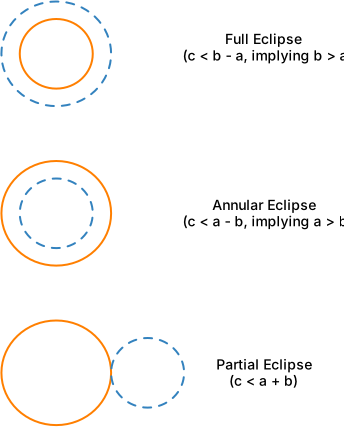
Figure 2: Occultation Disk Model
Total Eclipse (\(c < b-a\))
This type assumes that the apparent radius of the planet is larger than that of the sun (\(b>a\)). A total eclipse produces a total shadow, so the illumination fraction is 0.0.
Annular Eclipse (\(c < a-b\))
This type assumes the apparent radius of the sun is larger than that of the planet (\(a>b\)), so the disk of the planet lies entirely inside the solar disk. Use the equation for a circular area, \(A = \pi r^2\), to find the area of the sun and planet faces, replacing \(r\) with the corresponding apparent radius. The occulted area of the solar disk is the planet’s area \(A_P = \pi b^2\), and the illumination fraction is the visible fraction of the solar disk of area \(A_H = \pi a^2\).
Partial Eclipse (\(c < a+ b\))
For a partial eclipse, the occulted area is given by Eq. (16).
Parameters \(a\), \(b\), and \(c\) are those calculated previously in Eq. (12), (13), and (14). The values \(x\) and \(y\) are given by the following equations.
Like with the annular eclipse, the illumination factor for this type is one minus the ratio between the occulted area and the sun’s apparent area. This is given by the equation below.
Module Assumptions and Limitations
Occultation Model: Since the apparent radius of the sun is relatively small, the occultation can be modeled as overlapping disks.
No Eclipse: If the spacecraft is closer to the sun than the planet, an eclipse is not possible.
Planets: The allowed Spice planet names for use as occulting bodies are:
mercury,venus,earth,mars,mars barycenter,jupiter barycenter,saturn,neptune,uranus,custom
Custom Body: This module allows for the use of a single custom body, defined by the name
custom. The name of the SpicePlanetStateMsgPayload must be set tocustom, and the variablerEqCustommust be set to some positive value in meters.Sun and Planet States: The data defining the sun and planet states is obtained through an external Spice package. Errors may be derived from this package but will be small.
Spacecraft States: Spacecraft states must be input as Cartesian vectors. In the test, a conversion from orbital elements is performed.
Apparent Radii: When determining the type of eclipse, assume that the apparent separation \(c \geq 0\).
Total Eclipse (\(c<b-a\)): Assume the apparent radius of the planet is greater than that of the sun (\(b>a\)).
Annular Eclipse (\(c<a-b\)): Assume the apparent radius of the sun is greater than that of the planet (\(a>b\)).
User Guide
Setting The Spacecraft State Input Messages
The spacecraft state messages are read in by the eclipse module to determine where the spacecraft is relative to the sun and the planet(s). The module can handle a list of input messages, however, these are not set directly. Rather, use the method:
addSpacecraftToModel(scObject.scStateOutMsg)
The spacecraft state message is of type SCStatesMsgPayload.
Setting The Planet State Input Messages
The planet state input message is of type SpicePlanetStateMsgPayload. To add this as an input connection to eclipse, use the method:
addPlanetToModel(gravFactory.spiceObject.planetStateOutMsgs[0])
At least one planet must be specified. If there are multiple planets, then the illumination factor is only computed relative to the closest planet.
Setting the Sun State Input Message (Optional)
To connect to a sun state input message use:
eclipseObject.sunInMsg.subscribeTo(sunMsg)
Eclipse Output Messages
The eclipse module will output a series of messages of type EclipseMsgPayload corresponding to the number of spacecraft provided. The names of these output messages are auto-generated as follows:
eclipseObject.eclipseOutMsgs[0]
eclipseObject.eclipseOutMsgs[1]
eclipseObject.eclipseOutMsgs[2]
where 0 indicates the first spacecraft illumination factor messages, etc.
Spacecraft State Timing
The module is normally executed before the spacecraft within a task, so the spacecraft state message it reads was written
at the end of the previous step. By default the message is used as written. To avoid an output that lags the interval it is applied
to, the extrapolation can be enabled with setExtrapolateScStateToStepMidpoint(True). The spacecraft position is
then advanced with the message velocity by half of the message age, which is the middle of the interval that the next
spacecraft update integrates. It is skipped for a message that was written at the current time and for a stale
message that was written before the previous update of the module, for example a state written once at the start of
the simulation.
Warning
The extrapolation requires that the module is updated with the same task period as the spacecraft, so that the state message written by the spacecraft at the previous module update is exactly one module interval old. If the task periods differ, whether the spacecraft is faster or slower than the module, half of the message age is not the middle of the module interval. The state is then not extrapolated to the midpoint: the spacecraft stay at the epoch of their messages, and the planets are moved to that epoch if all the spacecraft messages were written at the previous module update (they are left as written otherwise), so that every spacecraft is evaluated against the same planet epoch. A warning is logged once when a spacecraft message is found not to have been written at the previous module update. A task period mismatch is not always detectable this way: a message written at the current module update, for example by a faster spacecraft that runs before the module, is used as written and gives no warning. No message that is not the output of the previous module update is ever extrapolated. A task period that changes during the simulation has the same effect. The extrapolation only starts once two write times of the spacecraft state message have been observed and their interval equals the module update interval, so the first updates are not extrapolated. Until then the spacecraft state is used as written and the sun and the planets are moved back to the epoch of that state, so the relative geometry stays consistent. Run the module in the same task as the spacecraft, or at the same period.
When the extrapolation is enabled the position and the orientation of the planet (or of the sun and the planets for the eclipse) are advanced, or moved back, with their message velocity and angular rate to the same middle of the interval as the spacecraft, so that the relative geometry is evaluated at a single epoch. Other time-dependent inputs, such as the epoch used for solar time or a space weather sample, are not shifted and are evaluated at the current time. As in the gravity effector, the planet is advanced by the time since its message was written, whatever the age of the message, so a planet message written once with a non-zero velocity is projected forward over the whole simulation.
-
class Eclipse : public SysModel
- #include <eclipse.h>
eclipse model class
Public Functions
-
Eclipse()
-
~Eclipse()
-
void Reset(uint64_t CurrenSimNanos)
Reset the module to origina configuration values.
-
void UpdateState(uint64_t CurrentSimNanos)
This method governs the calculation and checking for eclipse conditions.
- Parameters:
CurrentSimNanos – The current clock time for the simulation
-
void writeOutputMessages(uint64_t CurrentClock)
This method takes the computed illumination factors and outputs them to the messaging system.
- Parameters:
CurrentClock – The current simulation time (used for time stamping)
-
void addSpacecraftToModel(Message<SCStatesMsgPayload> *tmpScMsg)
This method adds spacecraft state data message names to a vector, creates a new unique output message for the eclipse data message.
- Parameters:
tmpScMsg – The state output message for the spacecraft for which to compute the eclipse data.
-
void addPlanetToModel(Message<SpicePlanetStateMsgPayload> *tmpSpMsg)
This method adds planet state data message names to a vector.
- Parameters:
tmpSpMsg – The planet name
-
void setExtrapolateScStateToStepMidpoint(bool enable)
Enables or disables the extrapolation of the spacecraft state to the middle of the interval the next spacecraft update integrates, see extrapolateScStateToStepMidpoint(). It is disabled by default, in which case the spacecraft state message is used as written. The extrapolation assumes that the module and the spacecraft run at the same task rate with a constant spacecraft step; a warning is logged once if a spacecraft message was not written at the previous module update, which is typically a task rate mismatch. A mismatch is not always detectable, but a message that is not the output of the previous module update is never extrapolated.
- Parameters:
enable – [-] true to extrapolate the spacecraft state to the middle of the step
-
bool getExtrapolateScStateToStepMidpoint() const
Returns whether the spacecraft state extrapolation is enabled.
- Returns:
[-] true if the spacecraft state is extrapolated
Public Members
-
ReadFunctor<SpicePlanetStateMsgPayload> sunInMsg
sun ephemeris input message name
-
std::vector<ReadFunctor<SpicePlanetStateMsgPayload>> planetInMsgs
A vector of planet incoming state message names ordered by the sequence in which planet are added to the module
-
std::vector<ReadFunctor<SCStatesMsgPayload>> positionInMsgs
vector of msgs for each spacecraft position state for which to evaluate eclipse conditions.
-
std::vector<Message<EclipseMsgPayload>*> eclipseOutMsgs
vector of eclispe output msg names
-
BSKLogger bskLogger
BSK Logging.
-
double rEqCustom
[m] Custom radius
Private Functions
-
void readInputMessages(uint64_t CurrentSimNanos)
This method reads the spacecraft state, spice planet states and the sun position from the messaging system. If enabled with setExtrapolateScStateToStepMidpoint(), the spacecraft state is extrapolated to the middle of the interval the next spacecraft update integrates, see extrapolateScStateToStepMidpoint().
- Parameters:
CurrentSimNanos – [ns] current simulation time
-
double computePercentIllumination(double planetRadius, Eigen::Vector3d r_HB_N, Eigen::Vector3d s_BP_N)
Compute the visible fraction of the solar disk given an eclipse.
- Parameters:
planetRadius – [m] equatorial radius of the occulting body
r_HB_N – [m] position of the sun relative to the spacecraft
s_BP_N – [m] position of the spacecraft relative to the occulting body
- Returns:
[-] illumination fraction, 0.0 for a total eclipse and 1.0 for no eclipse
-
double getPlanetEquatorialRadius(std::string planetSpiceName)
This method return planet radii.
- Parameters:
planetSpiceName – The planet name according to the spice NAIF Integer ID codes.
- Returns:
double The equatorial radius in metres associated with the given planet name.
Private Members
-
std::vector<float> planetRadii
[m] A vector of planet radii ordered by the sequence in which planet names are added to the module
-
std::vector<SCStatesMsgPayload> scStateBuffer
buffer of the spacecraft state input messages
-
std::vector<SpicePlanetStateMsgPayload> planetBuffer
buffer of the spacecraft state input messages
-
SpicePlanetStateMsgPayload sunInMsgState
copy of sun input msg
-
std::vector<double> eclipseIlluminationFactors
vector of illumination factor output values
-
uint64_t previousUpdateNanos = 0
[ns] time of the previous module update, used to detect stale spacecraft messages
-
ScStateExtrapolation scStateExtrapolation
opt-in extrapolation of the spacecraft state to the step midpoint
-
std::vector<std::unique_ptr<Message<EclipseMsgPayload>>> ownedEclipseOutMsgs
Storage for eclipseOutMsgs.
-
Eclipse()