scenarioMomentumDumpingMuJoCo
Review these prerequisite examples first:
scenarioMomentumDumping for the classic momentum-dumping sequence.
scenarioAttitudeFeedbackRWMuJoCo for reaction-wheel control with MuJoCo.
This script demonstrates how to run a reaction wheel momentum dumping scenario, translated from the classic Basilisk scenarioMomentumDumping example, using MuJoCo dynamics via MJScene instead of the traditional hub-centric Basilisk C++ Module: spacecraft dynamics.
Running the Example
Use a Basilisk installation with MuJoCo support and the example dependencies
described in Install. When building from source, enable
--mujoco True. With that Python environment active, run from the repository
root:
python examples/mujoco/scenarioMomentumDumpingMuJoCo.py
The script displays the result plots. When importing the scenario from
examples/mujoco, call run(showPlots=False) to run without displaying
windows; it still returns a dictionary of Matplotlib figures for inspection
or saving.
Model and Control Setup
The multi-body system is created programmatically as a MuJoCo XML string. It consists of a free-floating spacecraft bus (“hub”) carrying 4 reaction wheel rigid bodies (“rw1Spin” … “rw4Spin”) mounted at canted spin axes, and 8 thrusters attached directly to the hub via fixed sites. Each wheel spin degree of freedom (DOF) is driven by a MuJoCo single-input torque actuator, and each thruster site has a MuJoCo motor actuator that applies force along the site’s z-axis.
A standard Basilisk flight software (FSW) stack uses the reaction wheels to point the hub at a fixed inertial attitude. The attitude control system (ACS) thrusters remove excess wheel momentum in an explicitly requested dumping sequence:
C Module: inertial3D generates a fixed inertial attitude reference.
C Module: attTrackingError computes the attitude and rate tracking errors.
C Module: mrpFeedback computes the commanded body control torque.
C Module: rwMotorTorque maps the commanded body torque into individual wheel motor torque commands.
C Module: thrMomentumManagement checks the net wheel momentum once on its first update after each
Reset(). If the magnitude exceedshs_min, it requests an angular-momentum change, delta-H [N m s], to reduce it to that level. Otherwise it requests zero change. Later threshold crossings do not trigger another check unless the module is reset again.C Module: thrForceMapping maps the desaturation delta-H request into individual thruster impulse requests [N s].
C Module: thrMomentumDumping divides the requested impulses by the configured maximum thrust [N] to obtain firing durations [s], then distributes them over discrete on-time pulses.
This chain reuses CmdTorqueBodyMsgPayload.torqueRequestBody to carry
angular impulse [N m s], and THRArrayCmdForceMsgPayload.thrForce to carry
linear impulse [N s]. Despite their field names, these values represent
impulses in this application. The subsequent thrOnTimeToForce adapter
produces the instantaneous force commands [N] sent to the actuators.
See scenarioMomentumDumping for more detail on this control sequence.
Several small adapter modules bridge Basilisk messaging to MuJoCo objects:
C++ Module: arrayMotorTorqueToSingleActuators splits the single
ArrayMotorTorqueMsgfromrwMotorTorqueinto individualSingleActuatorMsgcommands, one per MuJoCo wheel actuator.C++ Module: scalarJointStatesToRWSpeed reads each wheel’s spin rate directly from its MuJoCo joint state and republishes them as a single
RWSpeedMsgfor the momentum-management chain.C++ Module: thrOnTimeToForce converts the thruster on-time pulse commands from
thrMomentumDumpinginto instantaneous force commands for each MuJoCo thruster actuator.
Earth gravity is configured using NBodyGravity with a pointMassGravityModel as the central body, applied to the hub only.
The spacecraft is placed on a near-circular low Earth orbit (LEO), and the
wheels are initialized above the 80 N m s momentum threshold. The simulation
runs to 10 seconds, then explicitly resets thrMomentumManagement. Its
next FSW update at 11 seconds publishes a fresh delta-H request. This avoids
the initial request at time zero, whose timestamp is not recognized as a
new request by thrMomentumDumping after initialization. The simulation
continues to a total elapsed time of 5 minutes while the wheels provide
attitude control and the thrusters execute the requested dumping sequence.
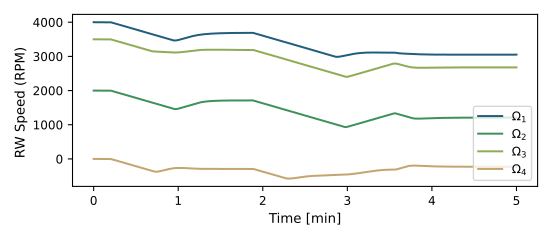
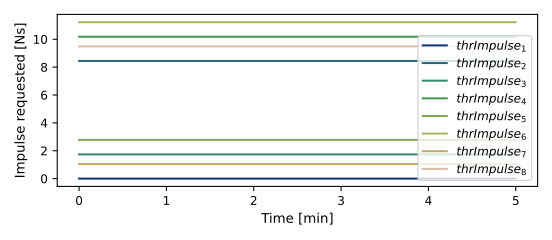
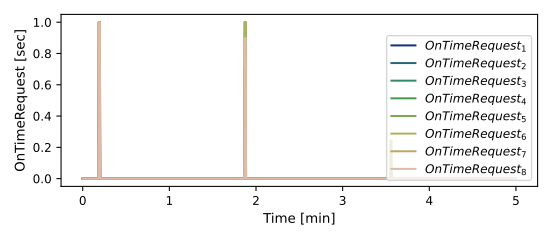
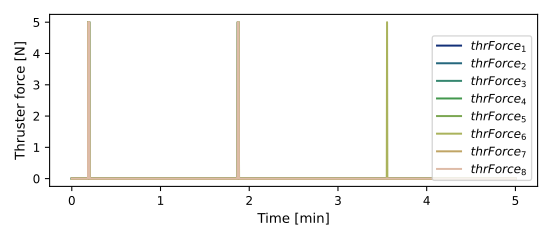
Attitude error, rate tracking error, individual and total wheel momenta, requested angular-momentum change, wheel speeds, thruster impulse requests, thruster on-time requests, and delivered thruster forces are plotted at the end.
Illustration of Simulation Results
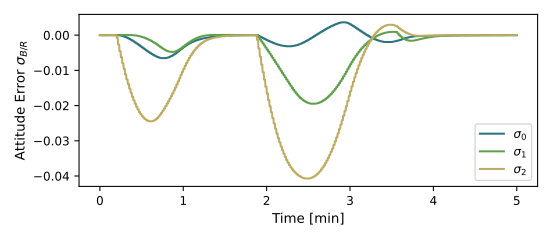
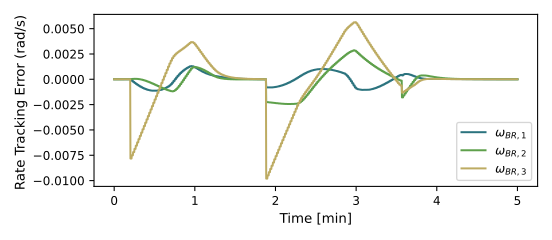
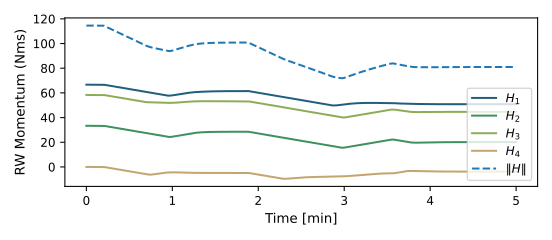
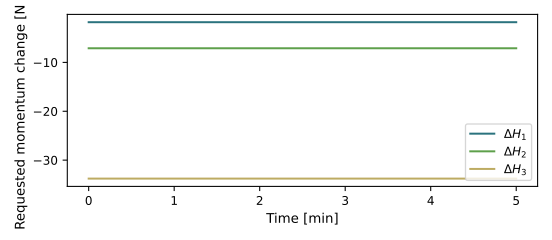
The delta-H plot shows the command held between momentum-management resets, not the accumulated momentum removed by the thrusters. Use the wheel-momentum history above to assess the resulting change in stored wheel momentum.
- scenarioMomentumDumpingMuJoCo.addRWsXML(rwPos: list, rwAxes: list, rwFactory: rwFactory, maxMomentum: float = 100.0, baseIndent: int = 3)[source]
Build MuJoCo XML for reaction-wheel bodies and motor actuators.
- Parameters:
rwPos – Wheel mounting positions in the hub frame [m], one three-component vector per wheel.
rwAxes – Unit spin-axis vectors in the hub frame, in the same order as
rwPos.rwFactory – Factory in which the wheel configuration objects are created and registered.
maxMomentum – Maximum momentum specification per wheel [N m s]. Defaults to 100.0 N m s.
baseIndent – Number of leading indentation tabs for wheel-body XML. Defaults to 3.
- Returns:
A tuple containing the wheel-body XML, motor-actuator XML, and list of registered wheel configuration objects in mounting order.
- Return type:
tuple[str, str, list]
- scenarioMomentumDumpingMuJoCo.addThrustersXML(thrustLocs: list, thrustDirs: list, thrFactory: thrusterFactory, maxThrust: float = 5.0, baseIndent: int = 2)[source]
Build MuJoCo XML for thruster sites and force actuators.
- Parameters:
thrustLocs – Thruster mounting positions in the hub frame [m], one three-component vector per thruster.
thrustDirs – Unit thrust directions in the hub frame, in the same order as
thrustLocs.thrFactory – Factory in which the thruster configuration objects are created and registered.
maxThrust – Maximum thrust per thruster used for the FSW configuration and MuJoCo actuator control limit [N]. Defaults to 5.0 N.
baseIndent – Base number of indentation tabs for the generated XML. Defaults to 2; site elements receive one additional tab.
- Returns:
A tuple containing the site XML, force-actuator XML, and list of registered thruster configuration objects in mounting order.
- Return type:
tuple[str, str, list]
- scenarioMomentumDumpingMuJoCo.makeMjXmlString()[source]
Build MuJoCo XML for a hub with four wheels and eight ACS thrusters.
The hub, wheel, and thruster properties are specified within this function.
- Returns:
A tuple containing the complete model XML, wheel configuration objects, thruster configuration objects, reaction-wheel factory, and thruster factory, in that order.
- Return type:
tuple
- scenarioMomentumDumpingMuJoCo.plot_DH(timeData, dataDH)[source]
Plot the requested angular-momentum change in body-frame components.
- Parameters:
timeData – Sample times [min].
dataDH – Requested delta-H vectors [N m s], with one row per sample and columns for the body x, y, and z components. These commands are held between momentum-management resets; they are not measurements of accumulated momentum removal.
- Returns:
Figure showing the three components of the delta-H request.
- Return type:
matplotlib.figure.Figure
- scenarioMomentumDumpingMuJoCo.plot_OnTimeRequest(timeData, dataOnTime, numTh)[source]
Plot the thruster on time requests.
- scenarioMomentumDumpingMuJoCo.plot_attitude_error(timeData, dataSigmaBR)[source]
Plot the attitude errors.
- scenarioMomentumDumpingMuJoCo.plot_rate_error(timeData, dataOmegaBR)[source]
Plot the body angular velocity rate tracking errors.
- scenarioMomentumDumpingMuJoCo.plot_rw_momenta(timeData, dataOmegaRw, RW, numRW)[source]
Plot the RW momenta.
- scenarioMomentumDumpingMuJoCo.plot_rw_speeds(timeData, dataOmegaRW, numRW)[source]
Plot the RW spin rates.
- scenarioMomentumDumpingMuJoCo.plot_thrForce(timeDataFSW, dataThr, numTh)[source]
Plot the Thruster force values.
- scenarioMomentumDumpingMuJoCo.plot_thrImpulse(timeDataFSW, dataMap, numTh)[source]
Plot the Thruster force values.
- scenarioMomentumDumpingMuJoCo.run(showPlots: bool = False)[source]
Run five minutes of wheel attitude control and requested desaturation.
- Parameters:
showPlots – Display the Matplotlib figures and wait for the plot windows to close when True. Defaults to False; figures are still generated and returned in either case.
- Returns:
Dictionary mapping scenario-prefixed names to eight Matplotlib figures: attitude and rate errors, wheel momenta, requested momentum change, wheel speeds, thruster impulses, on-times, and forces. No files are saved by this function.
- Return type:
dict