scenarioThrusterArm
Overview
This scenario demonstrates effector branching for a thruster mounted on a two-degree-of-freedom articulated arm. See Advanced: Effector Module Branching for the conceptual background on attaching dynamic effectors onto state effectors. The arm is modeled with a single C++ Module: spinningBodyTwoDOFStateEffector, attached to a rigid hub with stiffness and damping at each axis. A C++ Module: thrusterDynamicEffector is rigidly mounted at the tip of the outer arm segment.
The same simulation is executed twice with identical initial conditions and thruster command. The two cases differ only in where the thruster’s force and torque are applied to the multibody system:
Effector-branched (correct): the thruster is attached as a dynamic effector of the arm tip segment via
addToSpacecraftSubcomponent. The thrust force and torque are accumulated into the arm’s equations of motion and propagate through the joints into the hub.Hub-direct (naive): the thruster is attached as a dynamic effector of the hub via
addToSpacecraft, located at the initial tip position and pointed along the initial tip thrust direction expressed in the body frame. This modeling approximation ignores the multibody coupling. The thruster does not move with the arm and applies its wrench at a fixed B-frame location and direction throughout the burn.
Comparing the hub state and joint-angle responses between the two cases isolates the contribution of effector branching to the predicted dynamics.
The script is found in the folder basilisk/examples and executed by:
python3 scenarioThrusterArm.py
Illustration of Simulation Results
The default run() invocation reproduces the configuration presented in the companion
journal article (citation pending publication). The scenario exposes no integration
parameters, so the test harness runs it exactly as documented here.
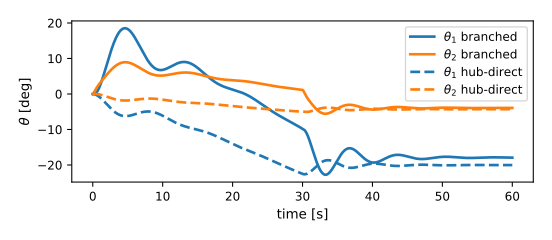
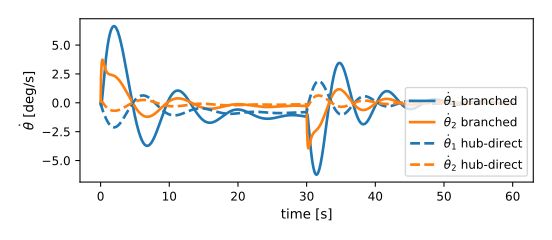
The arm is initialized with both joint angles at zero. Joint angles and rates are plotted with
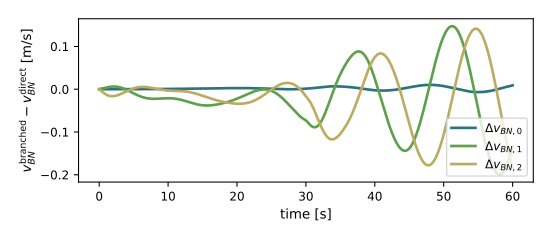
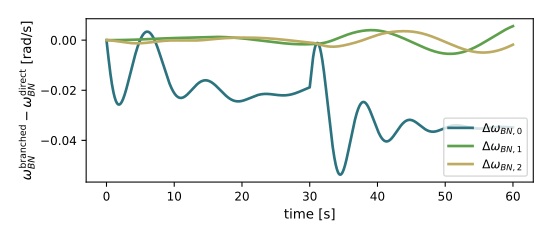
both cases overlaid (solid for effector-branched, dashed for hub-direct). Hub inertial velocity
and body-frame angular velocity are plotted as the difference between the two cases, isolating
the modeling error that would be incurred by applying the thruster wrench directly to the hub.
Uncommenting the saveFile argument writes a Vizard .bin per case, suffixed _branched
and _direct, for side-by-side 3D playback.
- scenarioThrusterArm.initialTipFrameInB(arm)[source]
Compute initial outer-segment tip position and S2-frame z-axis direction in B coords.
Used to mount the hub-direct thruster at the same physical pose the effector-branched thruster has at t = 0.
- scenarioThrusterArm.run(show_plots)[source]
Execute the branched and hub-direct cases and overlay the results.